
TrueLuck Casino App: Download And Play on Android & iOS
The TrueLuck Casino App makes online gambling more convenient than ever, placing thousands of TrueLuck Casino games at your fingertips. Instead of hunting for a mobile site in a cluttered browser, you can launch a dedicated app-like shortcut with a single tap. This platform condenses everything—slots, live tables, instant wins, and even specialized bonuses—into a format that’s easy to navigate on smaller screens.
Beyond sheer convenience, the app is also built for efficiency. It’s not the traditional app, but a Progressive Web Application (PWA). You access it via the mobile browser. The website loads quickly and needs no free storage.
TrueLuck App Features
Below is a table highlighting the key characteristics that set TrueLuck’s mobile solution apart. While a standard mobile browser version can suffice for quick visits, this app-like approach adds a layer of polish, speed, and exclusivity.
| Feature | Details |
|---|---|
| Game Library | Access 5,000+ casino games (slots, jackpots, live dealer, table games, and instant wins). |
| Compatibility | Android 6.0+ (via Chrome or other modern browsers) and iOS 12.0+ (via Safari). |
| Storage Usage | Minimal, since it’s a PWA (no hefty downloads or constant updates). |
| Exclusive Bonuses | App-only offers, including free spins and deposit match promotions. |
| Fast Withdrawals | Prioritized payout processing, especially for Netherlands-based payment methods. |
| Security Layers | Data encryption, optional fingerprint/face ID logins, secure payment gateways. |
| Customer Support | 24/7 in-app live chat, email support, and a built-in FAQ section. |
| Automatic Updates | The app refreshes itself automatically whenever you revisit the site. |
This blend of features reflects TrueLuck’s commitment to providing reliable, streamlined gambling. From day one, you can enjoy a wealth of entertainment options without worrying about complicated downloads or slow loading times.
Interface and Design of TrueLuck App
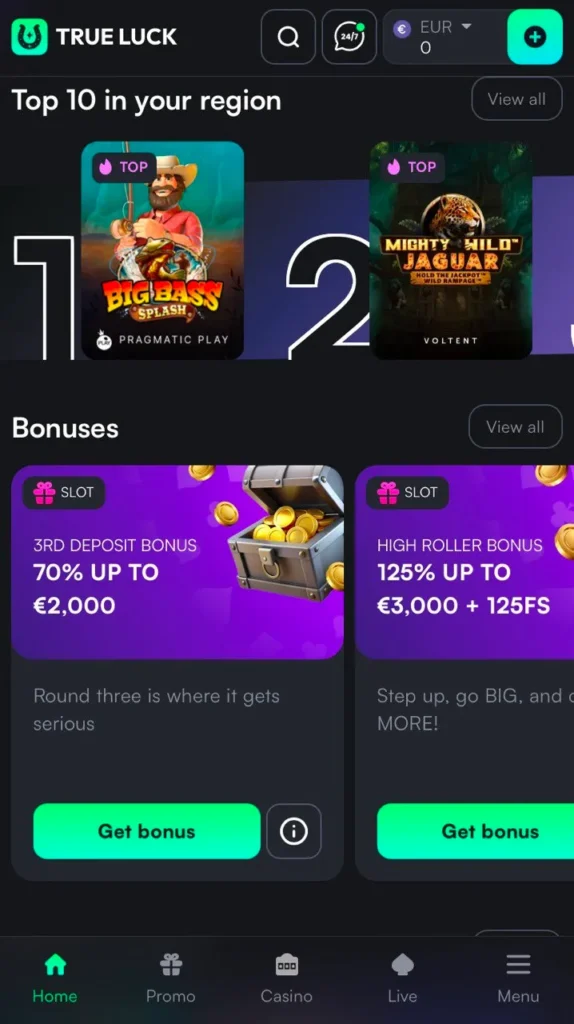
TrueLuck’s app layout is tailor-made for smaller screens, avoiding cluttered menus. All critical sections—like “Deposit,” “Withdraw,” and “Live Casino”—are accessible from the home page via large, tap-friendly icons. Vibrant thumbnails showcase each game, and scrolling feels smooth, even on older devices. Plus, the app’s color scheme is easy on the eyes, letting you focus on the main event: playing and winning.
How To Get Started in TrueLuck Casino App?
Ready to begin your journey at TrueLuck via the mobile app? Follow these steps to set up your account and dive into the action:
- Open the Official Website
- Launch your preferred mobile browser (Chrome for Android or Safari for iOS) and go to the TrueLuck website.
- If you’re already a registered player, tap “Log In.” If not, choose “Sign Up.”
- Complete Registration
- Fill out the brief form asking for details like your email, password, preferred currency (euros are usually default in the Netherlands), and any personal information required for verification.
- Some players prefer signing up via social media accounts or a single sign-on method if offered, saving a bit of time.
- Verify Your Account
- Check your email for a confirmation link or code. Clicking this finalizes the creation of your TrueLuck profile, ensuring you can deposit and withdraw without delays.
- Make a Deposit
- Go to the Cashier section, pick a payment option (credit/debit card, bank transfer, e-wallet, or crypto), and enter the amount.
- If there’s a bonus you want—like a first deposit match—select it before hitting “Confirm.”
- Launch the App Shortcut
- Once you’ve got your credentials ready and have installed the PWA (detailed in the next sections), open the TrueLuck Casino icon from your home screen. You’ll automatically be logged in (unless you choose additional security steps like fingerprint ID).
That’s it—you’re ready to explore thousands of slots, table games, and live experiences. Keep an eye on ongoing promotions and the VIP club to maximize your rewards.
App for Android
If you own an Android phone or tablet, getting the TrueLuck App is a straightforward process. Since it’s a Progressive Web App (PWA), you won’t find it in the Google Play Store. Instead, you’ll create a shortcut that behaves very much like a regular app:
Step-by-Step Installation Guide
- Open Chrome
- Use Google Chrome (or another up-to-date browser) on your Android device.
- Visit TrueLuck
- Head to the TrueLuck Casino website. You can type the URL directly or search “TrueLuck Casino” in Google.
- Access Browser Menu
- Look for the three vertical dots in the top-right corner of Chrome. Tap these to expand the menu.
- Select “Install App” or “Add to Home Screen”
- Depending on your Android version, you may see “Install TrueLuck” or “Add to Home Screen.” Once you tap it, a small pop-up might ask for confirmation or let you rename the shortcut.
- Confirm Installation
- Tap “Install” or “Add,” then wait a moment. You’ll see the TrueLuck icon appear on your home screen, just like a regular application.
- Open the App Shortcut
- Find the icon—usually named “TrueLuck”—and tap it to launch the casino lobby. Enter your login details (if you haven’t chosen “Remember Me”) and start exploring.
App for iOS
iOS devices also rely on a PWA format since Apple has specific guidelines for third-party gambling apps in the App Store. Here’s how you can install the TrueLuck shortcut on an iPhone or iPad:
Step-by-Step Installation Guide
- Open Safari
- It’s a native Apple browser that allows for the good performance of the “add to Home Screen” option.
- Visit TrueLuck Casino
- Go to TrueLuck Casino using Safari. Once the site loads, log in or sign up if you haven’t already.
- Tap the “Share” Icon
- Look for the square icon at the bottom of the screen. This is Safari’s share button.
- Choose “Add to Home Screen”
- Scroll through the list of actions until you find “Add to Home Screen.” Tap it to proceed.
- Rename Shortcut (Optional)
- The default name will likely be “TrueLuck.” You can keep it or change it to something like “TrueLuck Casino” for clarity.
- Press “Add”
- Safari will then create an icon on your home screen. When you tap this icon, it functions much like a native iOS app, providing a sleek interface for your games and account management.
How to Update TrueLuck App?
One major advantage of the Progressive Web App approach is automatic updates. You don’t need to visit an app store or manually download patches:
- Revisit or Refresh: Each time you open the app, it checks for new features or updates, downloading them in the background.
- Clearing Cache: If something looks outdated, you can clear your browser cache and reload the PWA to fetch the latest version instantly.
- No Forced Installs: There’s no wait time for lengthy downloads, making the update process far more convenient than a typical app store approach.
This method keeps the TrueLuck Casino App running smoothly and ensures you’re always connected to the newest promotions, game releases, or design improvements.
TrueLuck Support in Mobile App
TrueLuck offers several channels of support directly within the app:
- Live Chat
- Accessible via a floating icon or from the main menu. Live Chat generally connects you with a support agent within a minute or two.
- Email Assistance
- If your issue requires detailed explanations or file attachments (like screenshots), sending an email might be the better choice.
- Built-In FAQ
- For common queries—how to deposit, how to claim TrueLuck bonuses, or how the VIP program works—you can skim a concise FAQ right inside the app.
No matter how you choose to reach out, TrueLuck’s support is available around the clock. And if you prefer text-based help, you’ll appreciate the quick responses. If there’s a more complicated issue (e.g., a payment glitch), the team may request extra documents or screenshots, but they’ll guide you every step of the way.
The TrueLuck Casino App merges convenience, speed, and security for a complete mobile gambling solution. By adopting Progressive Web App technology, it eliminates tedious downloads and constant manual updates. You simply add a shortcut to your home screen, log in once, and enjoy the entire casino library—slots, table games, and live dealers—wherever you happen to be.
FAQ
Is It Available in the Netherlands?
Yes. TrueLuck is accessible to Dutch players, featuring local payment options (like Rabobank or ING) and euro-based transactions..
Is My Phone Compatible?
Most Android devices running version 6.0 or above can handle the PWA. For iPhones or iPads, iOS 12.0 or newer is recommended.
Are There Special Bonuses for the App?
Yes. TrueLuck periodically rolls out exclusive app deals, such as higher match bonuses or extra free spins. Keep notifications on to be the first to know.
Can I Use My Existing TrueLuck Account?
Absolutely. If you’re already a member, just log in as usual after installing the PWA. Your balance, progress, and VIP status all sync automatically.
What if I’m Blocked from Installing the PWA?
Sometimes older device settings or outdated browsers can interfere. Update your browser, clear cache, or consult the FAQ. Alternatively, you can still use the mobile site with no issues.